OpenAI
@OpenAI
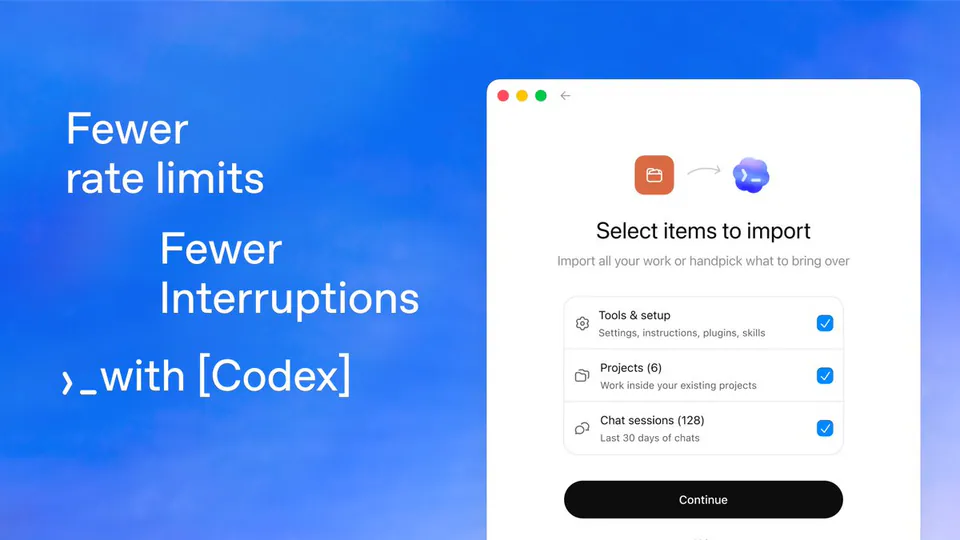
Bring your workflow to Codex in just a few clicks. Import settings, plugins, agents, project configuration, and more so you can keep working with fewer interruptions. Your move. https://t.co/uRu5VSeWuz
208retweets3.4klikes
View on X OpenAI
· Updated
OpenAI released a migration feature for the Codex app and CLI that imports configurations, plugins, and agent skills from other AI coding tools. By lowering the friction of switching platforms, OpenAI is targeting developers who have invested time in customizing rival agents. This move shifts the competition from raw model performance to the portability of a developer's personalized agent environment.
This update addresses the high switching costs associated with Codex agentic coding tools, where developers spend hours fine-tuning agent capabilities. The migration tool follows the release of OpenAI's Codex Pets, which added visual status monitoring to the desktop app to help developers track autonomous background tasks.
You can start the migration by selecting Import agent setup within the Codex app settings or using the CLI onboarding flow. The process generates a checklist of detected settings, allowing you to selectively copy configurations before resuming work. Codex is available through the ChatGPT Pro tier and enterprise plans.
Bring your workflow to Codex in just a few clicks. Import settings, plugins, agents, project configuration, and more so you can keep working with fewer interruptions. Your move. https://t.co/uRu5VSeWuz
Still wondering? A few quick answers below.
Every HeadsUpAI update is written based on its original source and reviewed before it's published. Read our editorial standards →
More like this