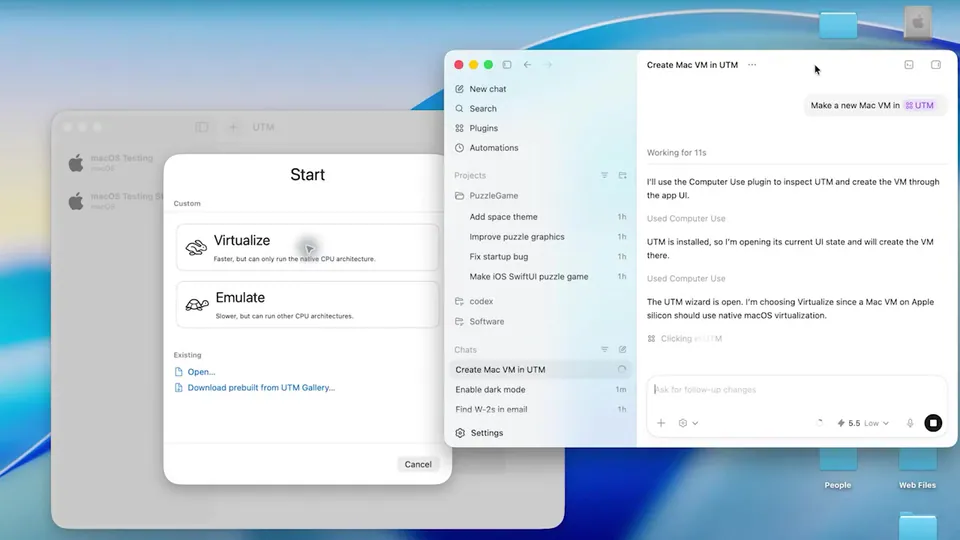
Codex anywhere and everywhere, all the time. Now your Mac doesn’t have to be unlocked for Codex to use your computer. From your phone, Codex can securely use apps on your Mac, even when the screen is off and locked. https://t.co/PCGK4i7FSF https://t.co/956aAtM3vl
OpenAI Enables Codex to Control Locked Macs From Your Phone
OpenAI launched Locked Use for the Codex desktop app, allowing the agent to interact with macOS applications even when the computer is locked. This extends Codex background computer use via an Apple authorization plug-in that lets the AI participate in the system's unlock flow without exposing the desktop to local users.
- Availability
- macOS (excluding EEA, UK, Switzerland)
- Required permissions
- Screen Recording and Accessibility
- Control interface
- ChatGPT mobile app
- Security mechanism
- Apple authorization plug-in
- Safety feature
- Relocks on local keyboard or pointer input
This update solves a major friction point for autonomous engineering agents running multi-step UI workflows. Previously, users left machines unlocked to maintain the agent's vision. Now, a Mac can act as a secure host for Codex remote connections, allowing work to continue while the owner is away.
Enable this in Codex settings by granting Screen Recording and Accessibility permissions. Once active, you can trigger tasks like UI bug reproduction from your phone while your Mac remains locked. The feature is currently available on macOS for users outside the European Economic Area, the UK, and Switzerland.
OpenAI Developers
@OpenAIDevs
312retweets5.3klikes
View on XStill wondering? A few quick answers below.
Locked Use is a feature for the Codex desktop app that allows the AI to continue using your Mac after the screen has locked and turned off. It uses a specialized Apple authorization plug-in to securely interact with your desktop applications, enabling long-running tasks to complete without requiring the computer to remain active and unlocked.
To enable this feature, open the Codex settings and navigate to the Computer Use section. You must install the Computer Use plugin and the Apple authorization plug-in. Additionally, you need to grant the Codex app Screen Recording and Accessibility permissions within your macOS System Settings so the agent can see and interact with your apps.
Yes, you can securely use apps on your Mac from the ChatGPT mobile app on your phone even when the Mac is locked. This allows you to start a task, such as reproducing a bug or running a UI flow, and monitor or manage the agent's progress remotely without needing to be at your desk.
At launch, the computer use feature in the Codex app is available on macOS globally except for the European Economic Area, the United Kingdom, and Switzerland. Users in these regions cannot currently access the feature, though it is available to macOS users in other supported territories who install the required plugins and permissions.
Codex only unlocks the Mac temporarily during active, trusted turns and covers every display to preserve privacy. It does not allow other local processes to unlock the computer. If the system detects any local keyboard or pointer input, Codex immediately relocks the Mac and pauses the automatic unlock process until you manually unlock it again.