Anthropic enables one-time autonomous background tasks in Claude Code

/schedule command in the CLI or web UI to set a future timestamp for execution. This builds on the autonomous workflows recently introduced to move execution to the cloud.This update fills the gap between immediate sessions and permanent recurring schedules. By supporting deferred execution, Claude Code moves closer to being an autonomous teammate that handles non-repeating maintenance. It removes the need for developers to manually return to a codebase for one-off tasks like deleting feature flags.
You can now schedule tasks like /schedule cleanup this feature flag in 1 week directly from your terminal. These one-off runs use standard account rate limits and are available to Pro, Max, Team, and Enterprise users. Manage all pending tasks through the Routines dashboard while the feature is in research preview.
Frequently asked questions
- What are Claude Code Routines?
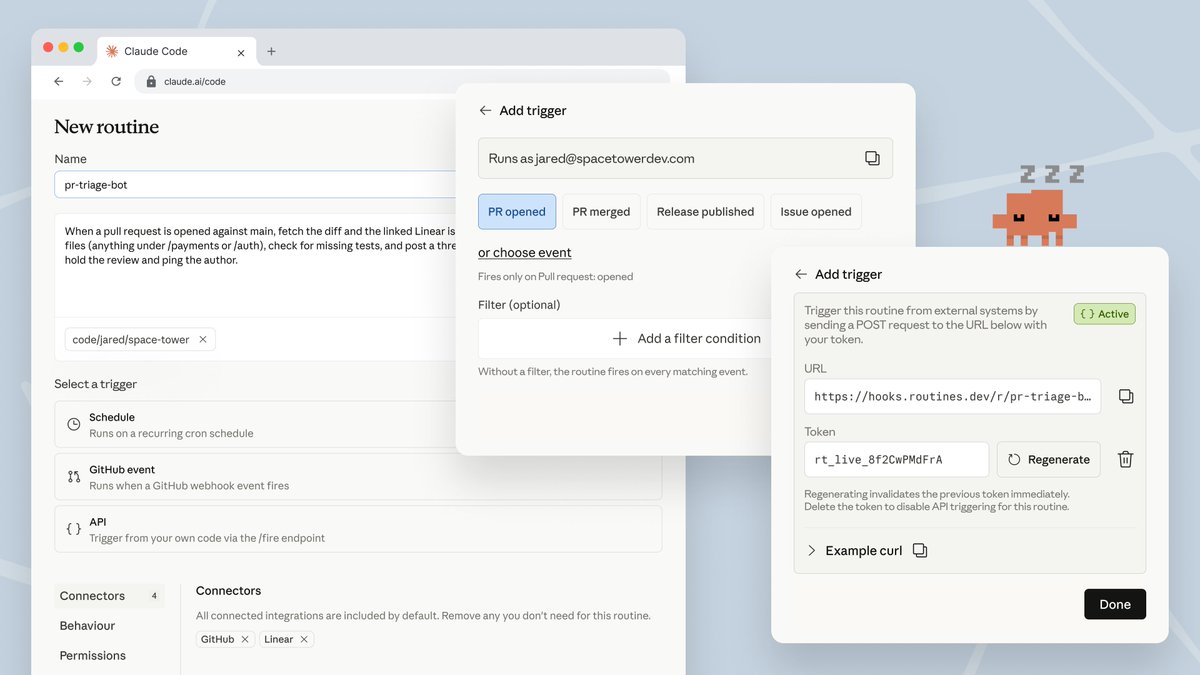
- Routines are saved Claude Code configurations that run autonomously on Anthropic-managed cloud infrastructure. They package a prompt, specific repositories, and connectors into a session that executes without requiring your local machine to be active. This allows for background automation like backlog maintenance, alert triage, or scheduled code reviews even when your laptop is closed.
- How do I schedule a one-time task in Claude Code?
- You can schedule a one-time task using the /schedule command in the Claude Code command line interface or through the Routines UI on the web. For example, typing /schedule cleanup this feature flag in one week tells the agent to execute that specific task at the designated future timestamp on Anthropic's managed cloud servers.
- Who can use the Claude Code Routines feature?
- Routines and the new one-time trigger are available to users on Claude Pro, Max, Team, and Enterprise plans. You must have Claude Code on the web enabled to use these cloud-based features. These tasks draw from your standard subscription usage limits and are subject to a daily cap on total runs per account.
- Do Claude Code Routines run on my local computer?
- No, Routines execute on Anthropic-managed cloud infrastructure. Unlike local scheduled tasks that require your laptop to be open and active, Routines continue to work even when your computer is closed. Each run starts a new cloud session that clones your selected repositories and uses your connected tools and environment variables to complete the task.
- What is the difference between a Routine and a local scheduled task?
- A Routine runs autonomously in the cloud and can be triggered by schedules, GitHub events, or API calls. Local scheduled tasks, created via the Desktop app or /loop command, run on your own machine and have access to local files. Routines are designed for unattended, repeatable work that needs to happen regardless of your machine's status.