HeadsUpAI

v0 Launches Browser Use to Autonomously Debug and Fix Web Applications

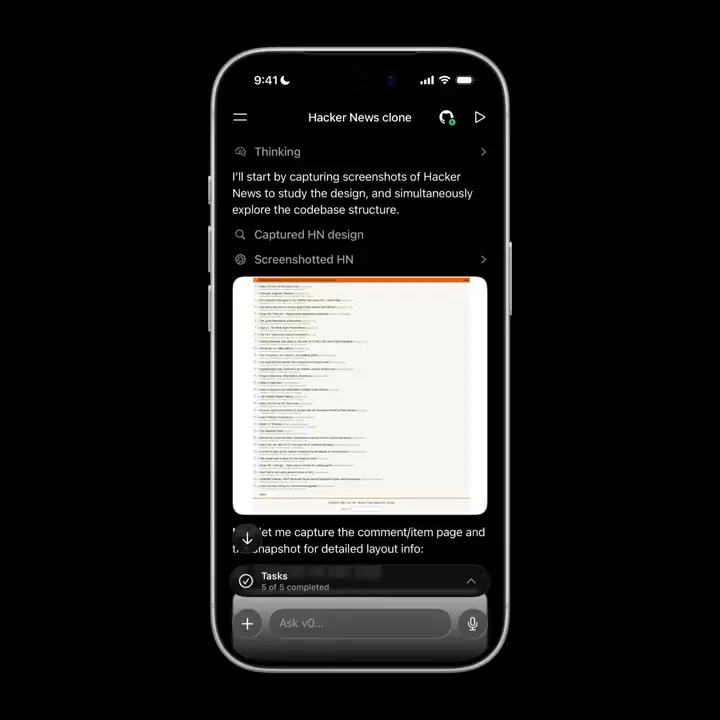
v0, the generative development platform from Vercel, launched Browser Use to give its AI agent the ability to interact with live web applications. The agent can now open apps, navigate complex user flows, and critique design elements. This allows v0 to move beyond code generation into active verification.

This update closes the feedback loop by giving the agent eyes to see its output. This follows recent additions like v0's terminal access and Vercel's agent-browser introspection capabilities. By observing the UI in real-time, the agent can catch visual regressions and logic errors.

You can now use v0 to build and test functional prototypes without manual browser refreshes. This capability extends Vercel Labs' Zero language initiative to optimize development for autonomous agentic loops. While the agent works, it provides visual feedback so you can monitor its progress and design critiques.

v0
v0
@v0
X

Introducing v0 Browser Use. v0 can now open the apps it builds, use them, critique designs, debug complex flows, and fix things proactively. While it's working, v0 will send you screenshots of what it sees. https://t.co/lPdFSbZSDq

48retweets651likes
View on X

Still wondering? A few quick answers below.

v0 Browser Use is a new capability for Vercel's generative development platform that allows the AI agent to open and operate the web applications it creates. This feature enables the agent to interact with the user interface directly, moving beyond simple code generation to verify that the application functions correctly in a live browser environment.

v0 uses the browser to navigate through the applications it builds, allowing it to test complex user flows and identify logic errors. By critiquing the design and functionality of the live site, the agent can proactively apply code fixes to resolve bugs or design inconsistencies it discovers during its autonomous browsing session.

Yes, v0 provides visual feedback while it is working in the browser. The agent provides real-time visual updates of what it sees to the user, ensuring transparency throughout the debugging process. This allows developers to monitor the agent's interactions, design critiques, and the specific steps it takes to verify or fix the application.

With Browser Use, v0 can autonomously open apps, navigate through different pages or states, and critique visual designs. It is specifically designed to debug complex flows and fix issues proactively. This means the agent can identify a problem while using the app and immediately update the underlying code to resolve the identified error.

Share this update