HeadsUpAI

Perplexity Integrates Apple Health and Function Lab Data for Personalized Insights

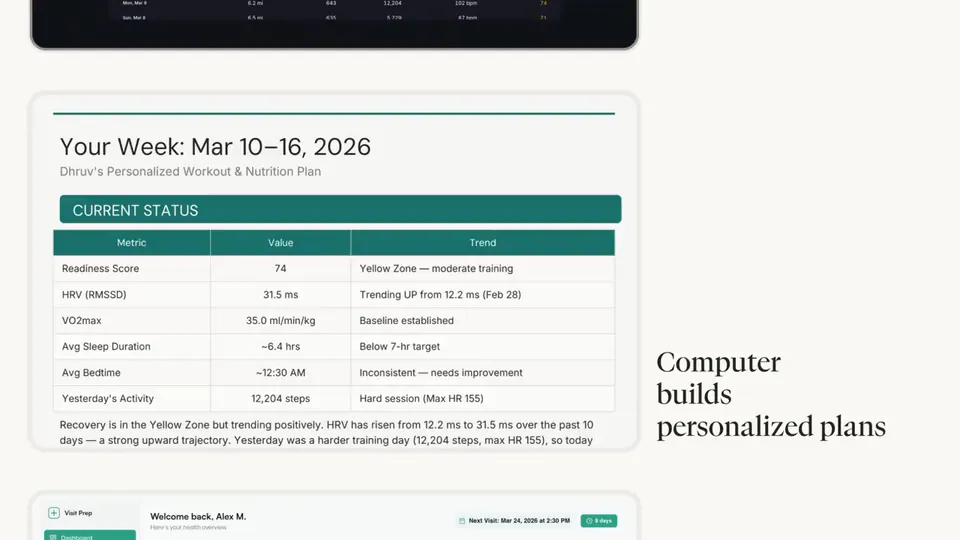
Perplexity has integrated personal health data from Apple Health and Function into its answer engine and Perplexity Computer agent. Users can now sync sleep, activity, and heart rate variability (HRV) metrics, while the Function connector adds blood panel results. This grounding in specific medical history allows the AI to analyze personal biological trends rather than just general web knowledge.
Apple Health Metrics
Sleep, activity, and HRV
Function Health Data
Biomarkers, blood draws, and panel results
Analysis Features
Trend dashboards and lifestyle correlation
Platform Support
iPhone and Mac app

This update moves the platform beyond general web search by grounding answers in a user's own biological data. By combining wearable metrics from Apple Health with clinical lab results from Function, the system can correlate lifestyle factors—such as sleep and activity—with biomarker trends. This reflects a broader industry shift toward proactive, data-grounded health assistants.

Users can now analyze Vitamin D levels or activity trends directly within Perplexity Health. The system generates trend dashboards and identifies lifestyle impacts based on connected data across devices. These features are available to users on the Mac app and iPhone, enabling the AI to orchestrate health insights using a user's actual medical records and wearable data.

Perplexity
Perplexity
@perplexity_ai
X

Two new ways to bring your health data into Perplexity. Perplexity now connects to Apple Health on iPhone. Use your sleep, activity, and HRV data in Computer. Function is now available in Perplexity Health. Add labs and ask about biomarkers, blood draws, or panel results. https://t.co/bdDOoxzhLR

20retweets253likes
View on X
Still wondering? A few quick answers below.

Perplexity can now connect to Apple Health on iPhone to retrieve sleep, activity, and heart rate variability (HRV) data. Additionally, it integrates with Function Health to access lab results, including biomarkers, blood draws, and full panel results, allowing the AI to analyze personal health trends over time.

By connecting a Function account, users can ask Perplexity Health about specific biomarkers and blood panel results. The AI analyzes these lab results to generate trend dashboards and can correlate this clinical data with lifestyle metrics from other connected apps to identify how habits impact overall health.

Yes, once the data is connected via the iPhone app, users can use the Perplexity Computer agent on the Mac app to query and analyze their health metrics. This cross-device orchestration allows the AI to use personal health data to answer complex questions across different operating environments.

Every HeadsUpAI update is written based on its original source and reviewed before it's published. Read our editorial standards →

Share this update