Cursor
@cursor_ai
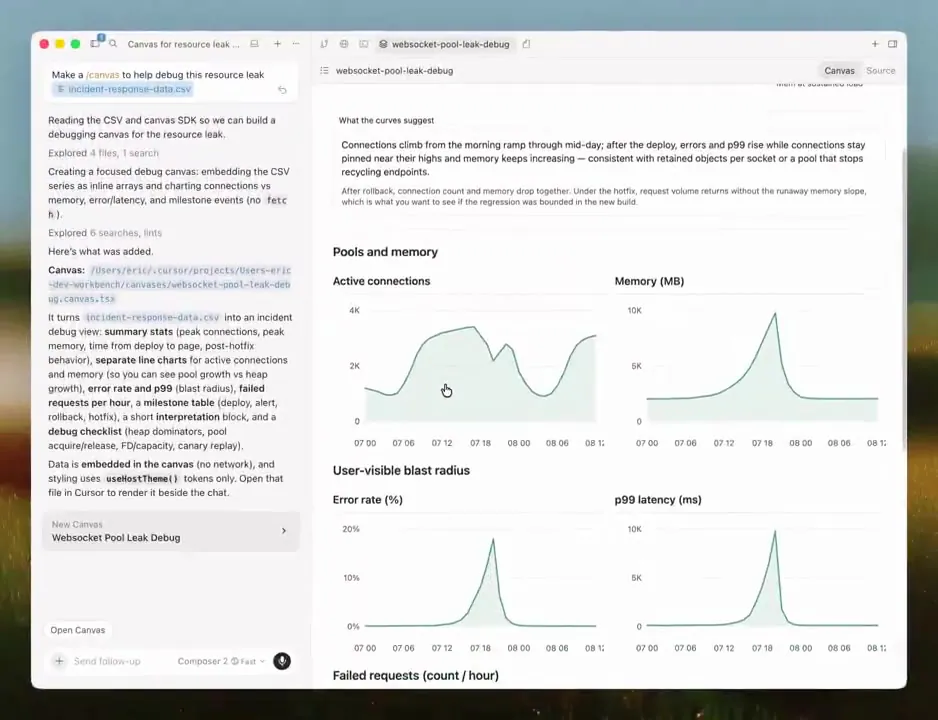
With canvases, Cursor can create apps like dashboards, reports, and internal tools. Now you can publish a canvas and share it with your team via URL. https://t.co/dHGRQhFEMH
32retweets896likes
View on X Cursor
· Updated
Cursor has updated its canvases feature, allowing users to publish and share AI-generated interactive applications like dashboards and internal tools via URL. This release also introduces a Design Mode for direct UI editing and an interactive report to visualize agent context usage. The enhancements aim to make AI-driven application development more collaborative, transparent, and iterative for teams.
Similar to Bolt.new and Replit, Cursor is moving beyond individual prototyping. The context usage report shows how agents consume tokens across system prompts and tool definitions, while Design Mode lets users annotate UI elements directly. Users can also ask follow-up questions to identify ways to reduce context usage.
Users can now publish canvases and share them with team members via URL for collaborative review. Design Mode offers a visual way to guide UI edits by pointing to specific elements. Furthermore, the context usage report helps identify ways to reduce token consumption, and agents can now embed buttons to run specific prompts.
With canvases, Cursor can create apps like dashboards, reports, and internal tools. Now you can publish a canvas and share it with your team via URL. https://t.co/dHGRQhFEMH
Still wondering? A few quick answers below.
Every HeadsUpAI update is written based on its original source and reviewed before it's published. Read our editorial standards →
More like this