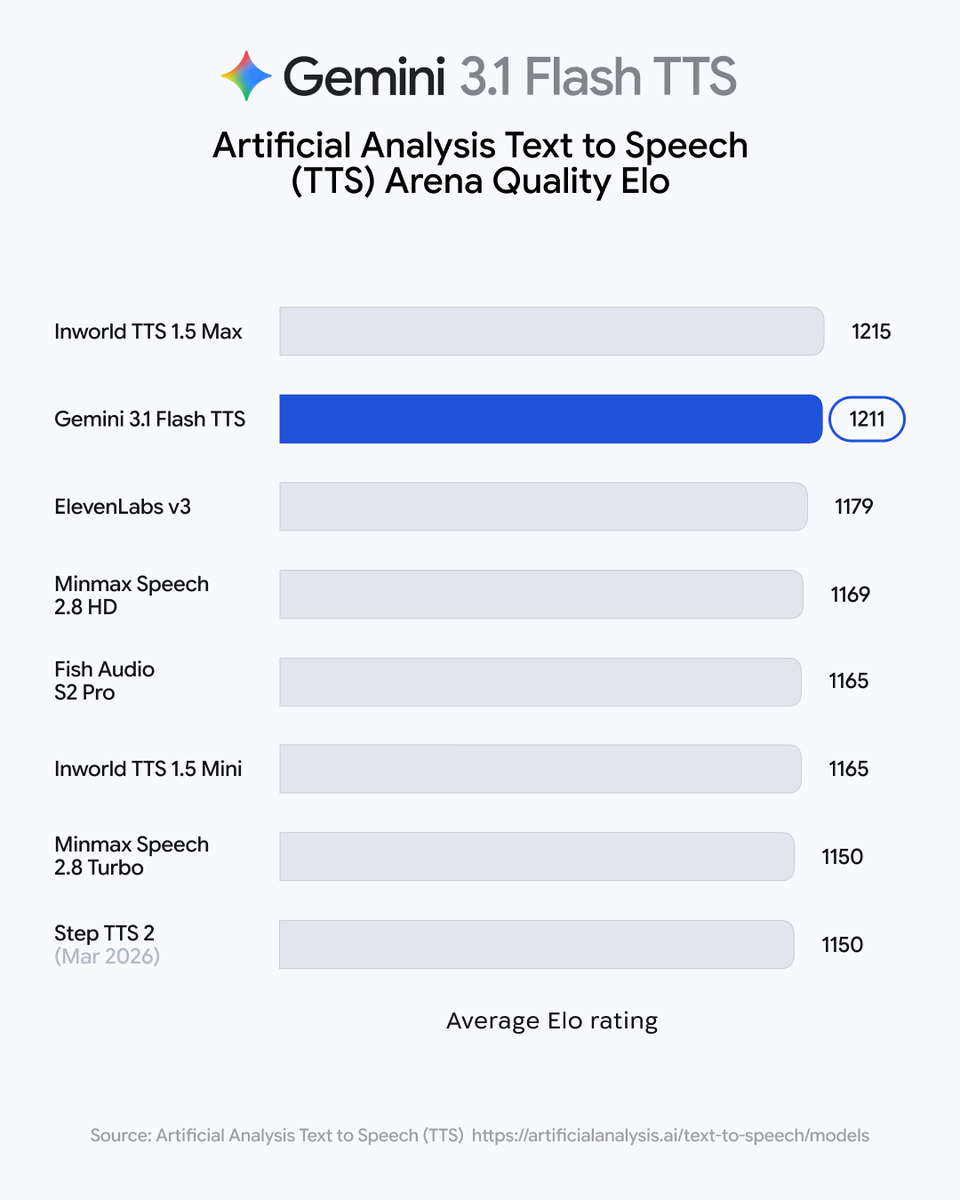
Last week, we launched Gemini 3.1 TTS, our latest and best text-to-speech model. This new model introduces [awe] audio tags, an intuitive way to guide vocal style, pace, and delivery. Here are some tips on the best ways to use audio tags in your prompts: 1. All inline tags must be enclosed in square brackets, such as [screams] or [whispers] 2. Insert these tags exactly where you want the transition to occur and make sure to avoid placing tags directly next to each other 3. Use tags like [slow] or [fast] to control the pace of the delivery, or even [short pause] or [long pause] to ramp up the anticipation in dramatic moments 4. The model also offers granular control over vocalizations, allowing you to direct the delivery with cues like [cackles] or [whispers] 5. An ideal audio tag formula could look something like: [encouraging] Let’s try that last sentence again to make sure that you nailed it. [slow] "L'oiseau s'est envolé." [short pause] Perfect! [laughs] You're a natural. No matter what you’re developing — from [scholarly] a language learning tool, to [mysterious] an interactive podcast app, to [friendly] more adaptive customer service offerings, and beyond — these prompting tips will equip you to start building with Gemini 3.1 TTS.