
HeadsUpAI

Cursor 3.3 Introduces Context Telemetry to Solve Agent Reasoning Issues

· Updated

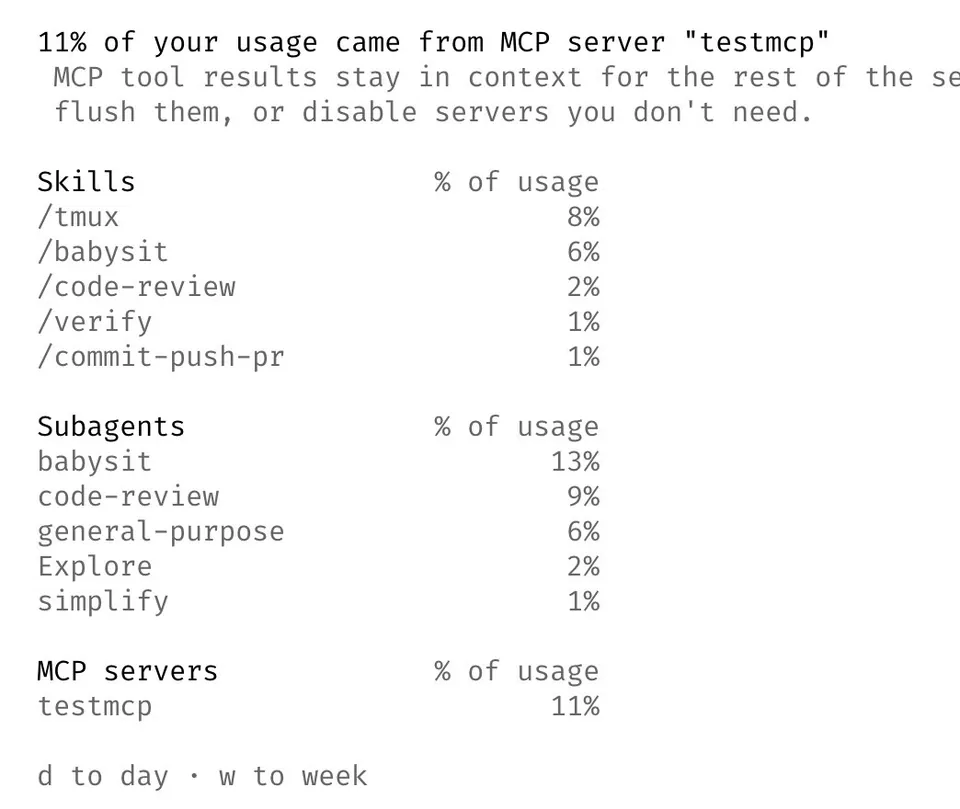
Cursor, an AI-first code editor from Anysphere, released version 3.3 with a context usage breakdown for its autonomous agents. This telemetry feature provides a granular view of how the agent utilizes its context window (the maximum data a model processes). It tracks token consumption across rules, skills, MCPs, and subagents.

This feature builds on Cursor's agent harness engineering and extends Cursor 3.2's parallel subagents by providing insight into their context consumption. If too many conflicting rules saturate the window, reasoning degrades. This update provides the visibility needed to diagnose why an agent might ignore specific instructions during long-running developer sessions.

Use these statistics to refine your setup, which adds to Cursor's environment autoinstall system for managing complex development configurations. The breakdown is available now in the Cursor 3.3 desktop application. By profiling usage, you can ensure critical project knowledge remains prioritized, leading to more reliable code generation and fewer corrections.

Cursor
Cursor
@cursor_ai
X

You can now see a breakdown of your agent's context usage in Cursor 3.3. Use these stats to diagnose context issues and improve your setup across rules, skills, MCPs, and subagents. https://t.co/lqs2lp8pn2

136retweets2.1klikes
View on X
Still wondering? A few quick answers below.

The context usage breakdown is a new telemetry feature in the Cursor 3.3 code editor that shows how an AI agent uses its available token budget. It provides a detailed statistical view of the information being sent to the model, allowing developers to see exactly which components are consuming the most space in the context window.

The feature tracks context consumption across four primary categories: rules, skills, MCPs, and subagents. Rules are custom instructions or project guidelines, while skills are specialized capabilities. MCPs refer to external tools connected via the Model Context Protocol, and subagents are auxiliary AI agents that handle parallel tasks or delegated workflows within a single session.

You can use these statistics to diagnose context issues that lead to agent hallucinations or reasoning errors. By identifying which rules or external tools are crowding the context window, you can prune redundant instructions or optimize your setup. This ensures that the most relevant project information remains prioritized, resulting in more accurate and reliable code generation.

The agent context usage breakdown was introduced in Cursor version 3.3. Users must update their desktop application to this version to access the new statistics and diagnostic tools. Once updated, the breakdown is available within the editor to help developers profile and manage how their AI agents interact with codebase rules and external capabilities.

Share this update